

Update .NET Supported OS Matrix
dotnet/core
Audits and updates the supported-os.json files for .NET releases, checking them against upstream lifecycle data and regenerating the markdown with the release-notes tool.
Adds shadcn/ui-styled README badges, badge groups, download charts, header banners and sponsor or contributor grids using the shieldcn service.
$ npx skills add jal-co/shieldcn --skill shieldcn-badges -a claude-codeProject install by default; add -g for ~/.claude/skills/.
$ gh skill install jal-co/shieldcn shieldcn-badges --agent claude-codeProject scope by default; add --scope user for a personal install. Needs GitHub CLI 2.90.0 or later (public preview).
$ git clone --depth 1 https://github.com/jal-co/shieldcn.git skills-src && mkdir -p .claude/skills && cp -r skills-src/skills/shieldcn-badges .claude/skills/shieldcn-badges && rm -rf skills-srcUse ~/.claude/skills/ instead of .claude/skills for a personal install. The folder must contain SKILL.md.
Claude Code skills documentation · loads skills from .claude/skills/
Install the "shieldcn-badges" agent skill from https://github.com/jal-co/shieldcn/tree/main/skills/shieldcn-badges into .claude/skills/shieldcn-badges/ in this project. Copy the whole folder (SKILL.md and every file beside it), keep the folder name "shieldcn-badges", then confirm the skill loads.Claude Code copies the folder itself, the same result as the manual copy. Check what it changed before you commit it.
$skill-installer install https://github.com/jal-co/shieldcn/tree/main/skills/shieldcn-badgesType this inside Codex. $skill-installer <name> installs a curated skill from openai/skills. The installer writes to $CODEX_HOME/skills (default ~/.codex/skills). Restart Codex if the skill does not show up.
$ npx skills add jal-co/shieldcn --skill shieldcn-badges -a codexProject install goes to .agents/skills/; add -g for ~/.codex/skills/.
$ gh skill install jal-co/shieldcn shieldcn-badges --agent codexProject scope by default (.agents/skills/); add --scope user for a personal install.
$ git clone --depth 1 https://github.com/jal-co/shieldcn.git skills-src && mkdir -p .agents/skills && cp -r skills-src/skills/shieldcn-badges .agents/skills/shieldcn-badges && rm -rf skills-srcUse ~/.agents/skills/ instead of .agents/skills for a personal install.
Codex skills documentation · loads skills from .agents/skills/
Install the "shieldcn-badges" agent skill from https://github.com/jal-co/shieldcn/tree/main/skills/shieldcn-badges into .agents/skills/shieldcn-badges/ in this project. Copy the whole folder (SKILL.md and every file beside it), keep the folder name "shieldcn-badges", then confirm the skill loads.Codex copies the folder itself, the same result as the manual copy. Check what it changed before you commit it.
$ npx skills add jal-co/shieldcn --skill shieldcn-badges -a cursorProject install goes to .agents/skills/; add -g for ~/.cursor/skills/.
$ gh skill install jal-co/shieldcn shieldcn-badges --agent cursorProject scope by default (.agents/skills/); add --scope user for a personal install.
$ git clone --depth 1 https://github.com/jal-co/shieldcn.git skills-src && mkdir -p .cursor/skills && cp -r skills-src/skills/shieldcn-badges .cursor/skills/shieldcn-badges && rm -rf skills-srcUse ~/.cursor/skills/ instead of .cursor/skills for a personal install.
Cursor skills documentation · loads skills from .cursor/skills/, .agents/skills/, .claude/skills/, .codex/skills/
Install the "shieldcn-badges" agent skill from https://github.com/jal-co/shieldcn/tree/main/skills/shieldcn-badges into .cursor/skills/shieldcn-badges/ in this project. Copy the whole folder (SKILL.md and every file beside it), keep the folder name "shieldcn-badges", then confirm the skill loads.Cursor copies the folder itself, the same result as the manual copy. Check what it changed before you commit it.
$ gemini skills install https://github.com/jal-co/shieldcn.git --path skills/shieldcn-badges--scope user (default) or --scope workspace; --path is the subfolder of the repo that holds the skill; --consent skips the security confirmation prompt.
$ npx skills add jal-co/shieldcn --skill shieldcn-badges -a gemini-cliProject install goes to .agents/skills/; add -g for ~/.gemini/skills/.
$ gh skill install jal-co/shieldcn shieldcn-badges --agent gemini-cliProject scope by default (.agents/skills/); add --scope user for a personal install.
$ git clone --depth 1 https://github.com/jal-co/shieldcn.git skills-src && mkdir -p .gemini/skills && cp -r skills-src/skills/shieldcn-badges .gemini/skills/shieldcn-badges && rm -rf skills-srcUse ~/.gemini/skills/ instead of .gemini/skills for a personal install, then run /skills reload.
Gemini CLI skills documentation · loads skills from .gemini/skills/, .agents/skills/
Install the "shieldcn-badges" agent skill from https://github.com/jal-co/shieldcn/tree/main/skills/shieldcn-badges into .gemini/skills/shieldcn-badges/ in this project. Copy the whole folder (SKILL.md and every file beside it), keep the folder name "shieldcn-badges", then confirm the skill loads.Gemini CLI copies the folder itself, the same result as the manual copy. Check what it changed before you commit it.
$ gh skill install jal-co/shieldcn shieldcn-badgesInstalls for Copilot at project scope by default; add --scope user for a personal install. Preview a skill first with gh skill preview. Needs GitHub CLI 2.90.0 or later (public preview).
$ npx skills add jal-co/shieldcn --skill shieldcn-badges -a github-copilotProject install goes to .agents/skills/; add -g for ~/.copilot/skills/.
$ git clone --depth 1 https://github.com/jal-co/shieldcn.git skills-src && mkdir -p .github/skills && cp -r skills-src/skills/shieldcn-badges .github/skills/shieldcn-badges && rm -rf skills-srcUse ~/.copilot/skills/ instead of .github/skills for a personal install. Commit .github/skills so cloud agent and code review can use it.
GitHub Copilot skills documentation · loads skills from .github/skills/, .claude/skills/, .agents/skills/
Install the "shieldcn-badges" agent skill from https://github.com/jal-co/shieldcn/tree/main/skills/shieldcn-badges into .github/skills/shieldcn-badges/ in this project. Copy the whole folder (SKILL.md and every file beside it), keep the folder name "shieldcn-badges", then confirm the skill loads.GitHub Copilot copies the folder itself, the same result as the manual copy. Check what it changed before you commit it.
$ npx skills add jal-co/shieldcn --skill shieldcn-badges -a opencodeOpenCode documents no install command of its own. Project install goes to .agents/skills/; add -g for ~/.config/opencode/skills/.
$ gh skill install jal-co/shieldcn shieldcn-badges --agent opencodeProject scope by default (.agents/skills/); add --scope user for a personal install.
$ git clone --depth 1 https://github.com/jal-co/shieldcn.git skills-src && mkdir -p .opencode/skills && cp -r skills-src/skills/shieldcn-badges .opencode/skills/shieldcn-badges && rm -rf skills-srcUse ~/.config/opencode/skills/ instead of .opencode/skills for a personal install.
OpenCode skills documentation · loads skills from .opencode/skills/, .claude/skills/, .agents/skills/
Install the "shieldcn-badges" agent skill from https://github.com/jal-co/shieldcn/tree/main/skills/shieldcn-badges into .opencode/skills/shieldcn-badges/ in this project. Copy the whole folder (SKILL.md and every file beside it), keep the folder name "shieldcn-badges", then confirm the skill loads.OpenCode copies the folder itself, the same result as the manual copy. Check what it changed before you commit it.
shieldcn-badgesAdds shadcn/ui-styled README badges, badge groups, download charts, header banners and sponsor or contributor grids using the shieldcn service.
shieldcn is an image service at shieldcn.dev that makes README badges styled like shadcn/ui, offered as a stand-in for Shields.io. The skill builds badge rows for npm version and downloads, GitHub stars, licence, CI status and last commit, along with grouped badges, download charts, adaptive header banners and sponsor or contributor grids.
It includes install steps through the Skills CLI and sample requests, such as migrating existing Shields.io badges to single-surface shieldcn badges, keeping the final row to 3-6 high-signal badges, and using GitHub picture markup so headers and badges follow light and dark mode. It also gives README Studio guidance for assembling a full README hero section.
10 steps, taken from the first numbered list in SKILL.md.
Read from SKILL.md and the folder at commit 4a98b45. It shows what the files ask for, not the result of running them.
Pre-approves nothing: there is no allowed-tools line, so your agent's usual permission prompts apply.
From allowed-tools in the SKILL.md frontmatter.
Shell commands in SKILL.md call:
npxnpmcurlFrom the folder's file list and the shell code blocks in SKILL.md.
Hosts in commands or code, which the agent is likely to contact:
shieldcn.devnpmjs.comFrom URLs in SKILL.md, links to its own repository left out.
Names no API keys, tokens, secrets or passwords.
From names ending in _API_KEY, _TOKEN, _SECRET, _KEY or _PASSWORD in SKILL.md.
README Badges and Headers loads about 4.3k tokens when it runs. Until then it costs about 157 tokens; SKILL.md has 1,177 words of instructions outside code blocks.
Estimates: characters ÷ 4, the usual rule of thumb; real counts depend on the model's tokenizer. Scripts and assets cost tokens only if the agent reads them.
The automated check found no risky patterns in SKILL.md.
Automated static check — not a guarantee. Review scripts before installing. It scans the text of SKILL.md for risky patterns (piping downloads into a shell, reading credential files, hidden Unicode, destructive commands); files beside SKILL.md are not scanned.
The full file from jal-co/shieldcn at commit 4a98b45, republished under its MIT licence (© jal-co). 1,177 words, ~4,269 tokens.
.claude/skills/shieldcn-badges/SKILL.md (or your agent's skills folder).Use shieldcn to add beautiful shadcn/ui-styled badges, badge groups, charts, headers, sponsors grids, and contributor images to READMEs and docs.
Base URL: https://shieldcn.dev
Install from the shieldcn repository with the Skills CLI:
npx skills add jal-co/shieldcnUseful variants:
# Install globally instead of only the current project
npx skills add jal-co/shieldcn --global

# Install for a specific agent supported by the Skills CLI
npx skills add jal-co/shieldcn --agent AGENT_NAME

# Use once without installing
npx skills use jal-co/shieldcn@shieldcn-badges
Verify installation:
npx skills listCopy one of these prompts after installing the skill. Replace bracketed values with the real project details.
Add a polished shieldcn badge row to my README for [owner/repo]. Include npm
version/downloads if this package is published as [package], GitHub stars,
license, CI status, and last commit. Center the row, make badges clickable, and
use a subtle shadcn style that works on GitHub light and dark themes.Replace the existing Shields.io badges in this README with shieldcn equivalents.
Keep the same links where possible, remove stale or duplicate badges, and keep
the final row to 3-6 high-signal badges.Migrate the existing Shields.io badges in this README to shieldcn, but undo any
split-style/two-tone badges. Use single-surface shieldcn badges instead: remove
split=true, labelColor, and other split-label styling unless a split badge is
explicitly needed for readability.Create a compact shieldcn badge group for [owner/repo] with stars, license,
contributors, and last commit. Use one grouped image when that is cleaner than
separate badges.Add release-quality README badges for a TypeScript library named [package]. I
want npm version, monthly downloads, license, types, GitHub stars, CI, and a
small branded static badge if it improves the visual hierarchy.Design the top of my README using shieldcn: add an adaptive header banner for
[project name], a one-sentence tagline, and a centered badge row. Use GitHub
<picture> markup so the header and badges adapt to light/dark mode.Add a left-aligned shieldcn header to my README with title [title], subtitle
[subtitle], logo [simple-icons slug], and a graph/grid style that fits a
technical open-source project.Add a shieldcn npm download chart for [package] to the README. Use a concise
caption and choose chart dimensions that work well on GitHub mobile.Add a shieldcn lifetime commit chart for [github username]. If multiple users
are listed, compare them in one chart and explain what the chart shows.Improve this README's above-the-fold impression with shieldcn. Keep the content
accurate, add a header, badges, and one chart only where they help, and avoid
visual clutter.I want to generate a whole README visually. Point me to shieldcn README Studio
and explain which blocks I should use for this project.When this skill is loaded for a README/docs task:
owner, repo, package names, workflow names, and links.<a> wrappers when they represent an external page.<p align="center"> for centered rows in GitHub READMEs.<picture> markup when a header/chart/badge needs explicit light
and dark URLs.https://shieldcn.dev/studio.https://shieldcn.dev/{provider}/{...params}.svg SVG badge/image
https://shieldcn.dev/{provider}/{...params}.png PNG badge/image
https://shieldcn.dev/{provider}/{...params}.json raw resolved data
https://shieldcn.dev/{provider}/{...params}/shields.json Shields.io-compatible JSONMarkdown patterns:
[](https://link)
Adaptive GitHub pattern:
<p align="center">
  <picture>
    <source media="(prefers-color-scheme: dark)" srcset="https://shieldcn.dev/header/graph.svg?title=Acme&subtitle=Build+faster&logo=react&mode=dark" />
    <img alt="Acme" src="https://shieldcn.dev/header/graph.svg?title=Acme&subtitle=Build+faster&logo=react&mode=light" />
  </picture>
</p>Both route styles work: /github/{topic}/{owner}/{repo} and
/github/{owner}/{repo}/{topic}.
| Badge | Endpoint | Example |
|---|---|---|
| Stars | /github/stars/{owner}/{repo} | /github/stars/vercel/next.js |
| Forks | /github/forks/{owner}/{repo} | /github/forks/vercel/next.js |
| License | /github/license/{owner}/{repo} | /github/license/vercel/next.js |
| Release | /github/release/{owner}/{repo} | /github/release/vercel/next.js |
| CI status | /github/ci/{owner}/{repo} | /github/ci/vercel/next.js |
| Issues | /github/issues/{owner}/{repo} | /github/issues/vercel/next.js |
| Open PRs | /github/open-prs/{owner}/{repo} | /github/open-prs/vercel/next.js |
| Contributors | /github/contributors/{owner}/{repo} | /github/contributors/vercel/next.js |
| Last commit | /github/last-commit/{owner}/{repo} | /github/last-commit/vercel/next.js |
| Watchers | /github/watchers/{owner}/{repo} | /github/watchers/vercel/next.js |
| Downloads | /github/dt/{owner}/{repo} | /github/dt/vercel/next.js |
| Dependabot | /github/dependabot/{owner}/{repo} | /github/dependabot/vercel/next.js |
CI supports ?workflow=name&branch=main.
| Badge | Endpoint | Example |
|---|---|---|
| npm version | /npm/{package} | /npm/react |
| npm version tag | /npm/v/{package}/{tag} | /npm/v/next/canary |
| npm weekly downloads | /npm/dw/{package} | /npm/dw/react |
| npm monthly downloads | /npm/dm/{package} | /npm/dm/react |
| npm yearly downloads | /npm/dy/{package} | /npm/dy/react |
| npm total downloads | /npm/dt/{package} | /npm/dt/react |
| npm license | /npm/license/{package} | /npm/license/react |
| npm types | /npm/types/{package} | /npm/types/react |
| npm dependents | /npm/dependents/{package} | /npm/dependents/react |
| PyPI version | /pypi/{package} | /pypi/flask |
| PyPI monthly downloads | /pypi/dm/{package} | /pypi/dm/flask |
| Crates.io version | /crates/{crate} | /crates/serde |
| Docker Hub pulls | /docker/pulls/{image} | /docker/pulls/library/nginx |
| JSR version | /jsr/{@scope}/{name} | /jsr/@std/path |
| Bundlephobia minzip | /bundlephobia/minzip/{package} | /bundlephobia/minzip/react |
| Homebrew version | /homebrew/{formula} | /homebrew/node |
| Maven version | /maven/{groupId}/{artifactId} | /maven/org.apache.maven/maven-core |
| Packagist version | /packagist/v/{vendor}/{package} | /packagist/v/laravel/framework |
| RubyGems version | /rubygems/{gem} | /rubygems/rails |
| NuGet version | /nuget/{package} | /nuget/Newtonsoft.Json |
| Pub.dev version | /pub/{package} | /pub/flutter |
| CocoaPods version | /cocoapods/{pod} | /cocoapods/Alamofire |
For npm scoped packages, keep the full scope: /npm/v/@scope/package.
| Badge | Endpoint | Example |
|---|---|---|
| Discord online | /discord/{serverId} | /discord/1316199667142496307 |
| Discord members by invite | /discord/members/{inviteCode} | /discord/members/nextjs |
| Reddit subscribers | /reddit/subscribers/r/{subreddit} | /reddit/subscribers/r/reactjs |
| Bluesky followers | /bluesky/followers/{handle} | /bluesky/followers/bsky.app |
| YouTube subscribers | /youtube/subscribers/{channelId} | /youtube/subscribers/UCxxxxxx |
| Mastodon followers | /mastodon/followers/{instance}/{acct} | /mastodon/followers/mastodon.social/Gargron |
| Hacker News karma | /hackernews/{userId} | /hackernews/pg |
| Codecov | /codecov/{service}/{owner}/{repo} | /codecov/gh/vercel/next.js |
| VS Code installs | /vscode/installs/{publisher}/{ext} | /vscode/installs/esbenp/prettier-vscode |
| WakaTime | /wakatime/{username} | /wakatime/@user |
| Skill installs | /skills/installs/{owner}/{repo}/{skill} | /skills/installs/vercel-labs/agent-skills/vercel-react-best-practices |
| Skill rank | /skills/rank/{owner}/{repo}/{skill} | /skills/rank/vercel-labs/agent-skills/vercel-react-best-practices |
| Trending skill rank | /skills/trending/{owner}/{repo}/{skill} | /skills/trending/vercel-labs/agent-skills/vercel-react-best-practices |
| Hot skill rank | /skills/hot/{owner}/{repo}/{skill} | /skills/hot/vercel-labs/agent-skills/vercel-react-best-practices |
| Type | Endpoint | Example |
|---|---|---|
| Static | /badge/{label}-{message}-{color} | /badge/build-passing-brightgreen |
| Dynamic JSON | /badge/dynamic/json?url=...&query=... | Fetch any JSON API |
| HTTPS endpoint | /https/{hostname}/{path} | Proxy a JSON endpoint |
| Badge group | /group/{badge1}+{badge2}.svg | /group/github/vercel/next.js/stars+github/vercel/next.js/license.svg |
Badge groups render several badges as one joined shadcn ButtonGroup-style image. Use them when a README row is visually busy or when the badges share one link.
Append query params as ?key=value&key2=value2.
| Param | Values | Default | Notes |
|---|---|---|---|
variant | default, secondary, outline, ghost, destructive, branded | default | shadcn Button variant |
size | xs, sm, default, lg | sm | Badge size |
mode | dark, light | dark | Explicit color mode |
theme | zinc, slate, blue, green, rose, orange, violet, purple, cyan, emerald | — | Theme accent |
font | inter, geist, geist-mono, jetbrains-mono, fira-code, roboto, space-grotesk | inter | Font family |
split | true, false | false | Two-tone label/value badge |
logo | SimpleIcons slug, ri:Name, data:image/svg+xml;base64,..., false | auto | Icon source |
logoColor | hex without # | auto | Icon color |
label | string | auto | Override label text |
color | hex without # | — | Main badge color |
labelColor | hex without # | — | Split label background |
valueColor | hex without # | — | Value text color |
labelTextColor | hex without # | — | Label text color |
labelOpacity | 0-1 | 0.7 | Label opacity in split badges |
gradient | comma-separated hex stops, optional angle | — | Example ff6b6b,4ecdc4,135 |
statusDot | true, false | auto for CI | Show a status dot |
animate | pulse, glow, shimmer, none | none | SVG-only animation |
height, fontSize, radius, padX, iconSize, gap, labelGap | number | per size | Fine tuning |
Style recommendations:
variant=secondary is the safest default for quiet, professional README rows.variant=branded is best for one or two brand badges, not every badge.split=true works well for status/data pairs where label and value should be
distinct.mode=light/mode=dark is useful inside <picture> for adaptive GitHub
READMEs.gradient= and animate= should be used sparingly; they are accents, not the
default look.Charts render as portable SVG/PNG images styled like shadcn cards.
Star history charts are retired — GitHub restricted the stargazers API to repo
admins/collaborators (June 2026). /chart/github/stars/... URLs render a
100×1 transparent image; use an issues, commits, or npm downloads chart
instead. Plain stars count badges still work.
/chart/github/issues/{owner}/{repo}.svg      issues over time
/chart/github/commits/{user}.svg             lifetime contribution commits
/chart/npm/{package}.svg                     npm download history
/chart/json.svg?values=10,25,40,30,60        inline values
/chart/json.svg?url=...&query=...            remote JSON values
Markdown example:
[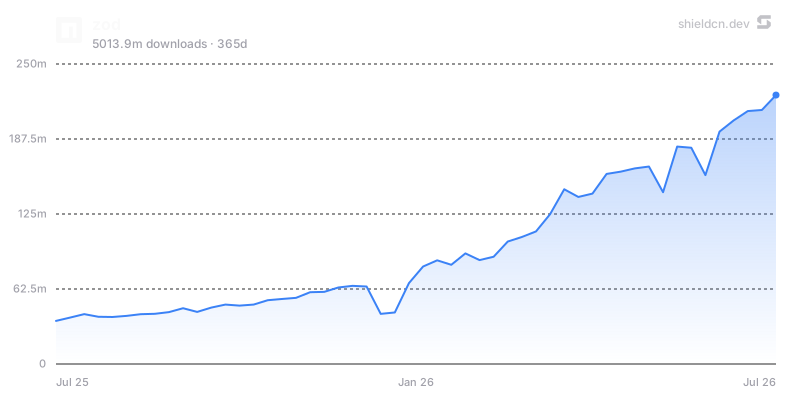](https://www.npmjs.com/package/zod)Chart params: theme, font, color, fill, area, width, height,
title, icon, iconColor, mode, bg/background, border, yScale,
yMin, yMax, yTicks, xTicks, and for npm charts days.
Use charts when they tell a story: adoption over time, download trend, issue load, or contribution history. Avoid adding charts purely as decoration.
Headers render repository banners from one URL.
/header/{preset}.svg?title=Acme&subtitle=A+delightful+toolkit
/header/{preset}.png?title=Acme&subtitle=A+delightful+toolkit
/header/{preset}.json?title=Acme&subtitle=A+delightful+toolkit
Presets: surface, gradient, dots, grid, graph, glow, transparent.
Common params: title, subtitle, logo, logoColor, theme, size,
width, height, align, font, border, radius, bg, gradient,
pattern, glow, accent, titleColor, subtitleColor, image, overlay,
tint, and watermark.
Centered header example:
<p align="center">
  <img src="https://shieldcn.dev/header/gradient.svg?title=Acme&subtitle=A+delightful+toolkit&logo=react" alt="Acme" />
</p>
Use align=left for technical/product README hero banners and align=center
for logos, frameworks, or portfolio-style projects. Use bg=transparent when
embedding into an already styled page.
/sponsors/{login}.svg
/contributors/{owner}/{repo}.svg
Both support SVG/PNG plus the same card background system used by headers:
preset, theme, bg, gradient, pattern, glow, image, overlay,
tint, accent, radius, border, and watermark. Contributors also support
controls like limit, min, and names.
Use these below the main intro or near community sections, not in the top badge row.
For building or redesigning an entire README visually, point the user to
README Studio: https://shieldcn.dev/studio.
README Studio is a Figma-style editor with reorderable blocks: Text/Markdown,
Header, Badges, Chart, Table, and Image. It exports clean GitHub-flavored
Markdown and has an Adaptive toggle that exports badges, headers, and charts as
GitHub <picture> elements that follow the reader's light/dark theme.
Suggest Studio when the user asks for a full README, a visual editor, a README generator, or broad redesign rather than a few specific badge/image edits.
.svg for Markdown images unless the target host requires PNG.variant=secondary for calm rows; use branded selectively.mode=light/mode=dark with <picture> when visual parity matters.npm version, GitHub stars, CI status.curl -I when editing real docs.© jal-co, MIT. Rendered from Markdown: HTML in the file is shown as text, images as links, and headings moved down two levels. Raw file
Just SKILL.md in skills/shieldcn-badges of jal-co/shieldcn.
Open the folder on GitHubat commit 4a98b45
README Badges and Headers next to the 5 skills that share the most tags, products or categories with it. Stars are the repository's; “used in” counts other GitHub owners with a copy.
| Skill | Stars | Used in | Tokens | Auto-check | Licence | Repo updated |
|---|---|---|---|---|---|---|
| README Badges and Headers this skilljal-co/shieldcn | 919 | — | ~4.3k | Automated safety check: Pass | MIT | |
| Update .NET Supported OS Matrixdotnet/core | 22k | — | ~4.1k | Automated safety check: Pass | MIT | |
| Ccb GitHubSeemSeam/claude_codex_bridge | 3.6k | — | ~4.9k | Automated safety check: Pass | Custom licence | |
| Release New Versionkcsujeet/ilamy-calendar | 351 | — | ~5.8k | Automated safety check: Pass | MIT | |
| Lint Repository Markdowncodsen/codsen | 214 | — | ~832 | Automated safety check: Pass | MIT | |
| Releaseemanuelcasco/pi-mono-extensions | 106 | — | ~2.3k | Automated safety check: Pass | MIT |
dotnet/core
Audits and updates the supported-os.json files for .NET releases, checking them against upstream lifecycle data and regenerating the markdown with the release-notes tool.
SeemSeam/claude_codex_bridge
Maintain this CCB project's GitHub-facing release and npm publication surface.
kcsujeet/ilamy-calendar
Cut a new release of @ilamy/calendar — analyze commits since the last tag, suggest a semver bump, draft a CHANGELOG entry in the project's existing style, run the CI gate, commit, tag, push to…
codsen/codsen
Keep the repository's linted Markdown passing npm run lint:markdown.
emanuelcasco/pi-mono-extensions
Release a new version of pi-extensions: bump individual package versions (independent mode), update CHANGELOGs and READMEs, create per-package git tags, publish a GitHub release, and publish…
prisma/orm
Keeps Markdown prose on one line per paragraph instead of wrapping at a fixed column, so renderers can reflow it and diffs stay clean.
Categories
Adds shadcn/ui-styled README badges, badge groups, download charts, header banners and sponsor or contributor grids using the shieldcn service. io. The skill builds badge rows for npm version and downloads, GitHub stars, licence, CI status and last commit, along with grouped badges, download charts, adaptive header banners and sponsor or contributor grids.
README Badges and Headers fits situations like: replacing Shields.io badges in a README; adding npm, GitHub and CI badges to an open source project; designing a README header with a tagline and a badge row; adding an npm download chart or a contributors grid.
Run `npx skills add jal-co/shieldcn --skill shieldcn-badges -a claude-code`. Or copy the skill folder (skills/shieldcn-badges in jal-co/shieldcn) into .claude/skills/shieldcn-badges in your project. Claude Code loads it when a task matches its description.
Run `npx skills add jal-co/shieldcn --skill shieldcn-badges -a codex`. Or copy the skill folder (skills/shieldcn-badges in jal-co/shieldcn) into .agents/skills/shieldcn-badges in your project. Codex loads it when a task matches its description.
Cursor, Gemini CLI, GitHub Copilot and OpenCode also load SKILL.md folders. With the skills CLI, run `npx skills add jal-co/shieldcn --skill shieldcn-badges -a cursor` (or -a gemini-cli, github-copilot or opencode for the others). To copy it by hand, put the folder in .cursor/skills/shieldcn-badges, .gemini/skills/shieldcn-badges, .github/skills/shieldcn-badges and .opencode/skills/shieldcn-badges in your project.
Going by SKILL.md and its folder, README Badges and Headers needs the command-line tools its instructions call (npx, npm and curl). Our summary lists: Network access to shieldcn.dev for the badge images.
SKILL.md names 2 domains. In commands or code: shieldcn.dev and npmjs.com; the agent is likely to contact these when it follows the instructions. This is read from the text; nothing was executed.
Our automated static check of SKILL.md found no risky patterns, such as piping downloads into a shell, reading credential files or hidden Unicode. It is not a guarantee. Review the folder before installing.
README Badges and Headers is published under the MIT licence (the repository's licence). It allows redistribution, so the full SKILL.md is shown on this page.
About 4.3k tokens (SKILL.md is roughly 17k characters). Agents keep only the skill's name and description in context until a task matches; then they load SKILL.md in full.
Skills that share tags, products or a category with README Badges and Headers: Update .NET Supported OS Matrix (dotnet/core, 22k stars), Ccb GitHub (SeemSeam/claude_codex_bridge, 3.6k stars), Release New Version (kcsujeet/ilamy-calendar, 351 stars) and Lint Repository Markdown (codsen/codsen, 214 stars). The comparison table on this page puts their stars, adoption, token cost, safety result and licence side by side.
jal-co (a GitHub user) maintains it in jal-co/shieldcn, which has 919 GitHub stars. The repository was last updated on October 10, 2026.
Source: jal-co/shieldcn on GitHub. Facts on this page come from the repository at the commit we read; the author's words are quoted as theirs.


